

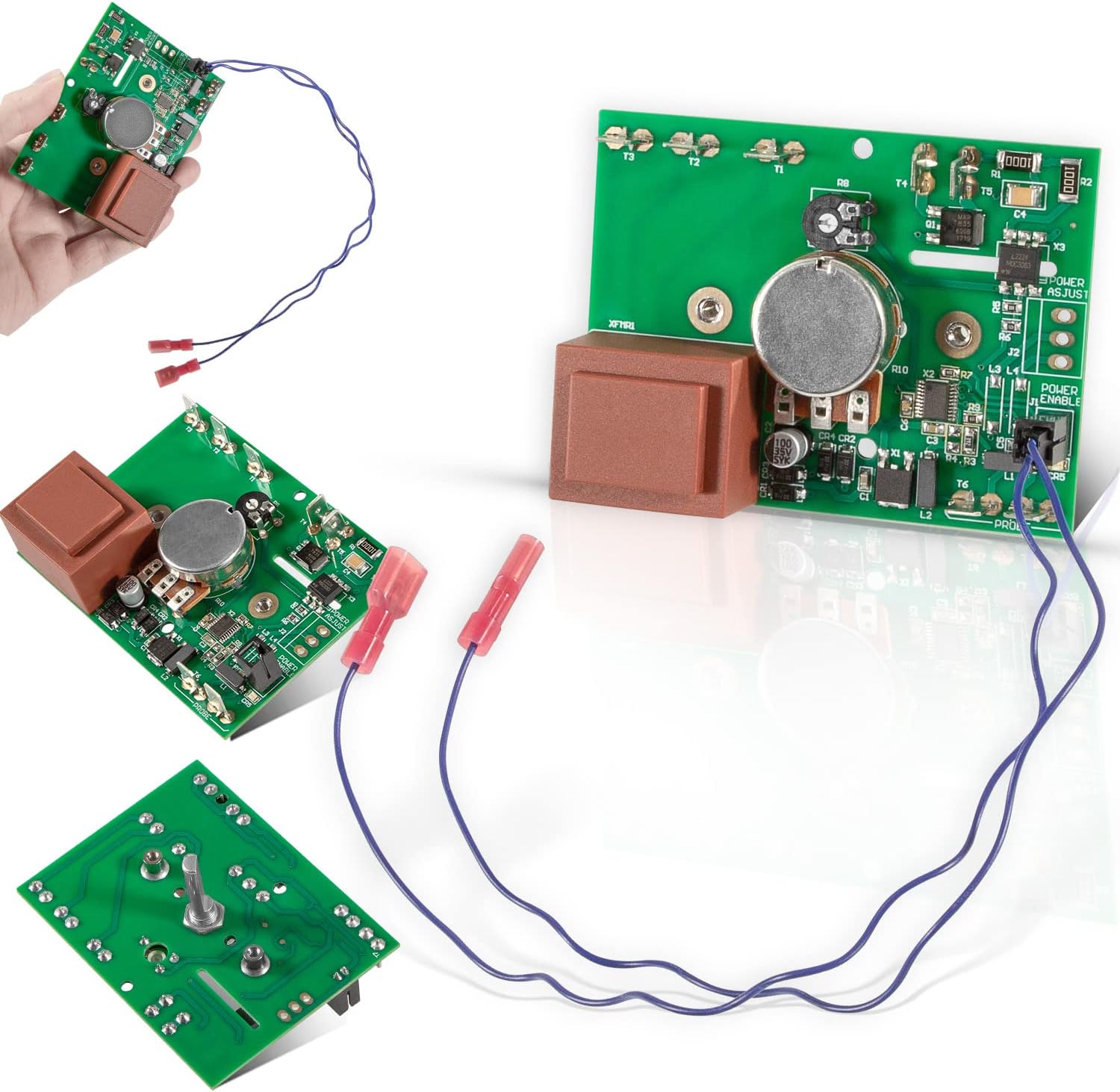
00-913149 NCC Temp Control Board Temperature Controller Kit w/Wire Harness,Replacement for Vulcan Hart, Hobart & Allpoints 00-353613-00002, 353613-2, 428897-8 Vulcan Hart Temperature Control Board
Product details
| Management number | 211143720 | Release Date | 2026/04/04 | List Price | $33.06 | Model Number | 211143720 | ||
|---|---|---|---|---|---|---|---|---|---|
| Category | |||||||||
00-913149 NCC Temp Control Board Temperature Controller How To Install This Part 1. Turn off the power to the Vulcan Hart oven and disconnect the power cord from the wall outlet. 2. Remove the oven’s control panel cover by removing the screws that hold it in place. 3. Disconnect any wires connected to the existing temperature controller and remove it from its mounting bracket. 4. Install the new temperature controller into its mounting bracket and connect all of the wires according to their labels or color codes. Make sure all connections are secure and tight. 5. Turn on the power to the oven and test that it is working properly by setting a desired temperature on the controller and observing that it is heating up correctly. If not, check all of your connections again for any loose wires or incorrect wiring.
- 【Compatible Model】 00-913149 Temp Control Board with Wire Harness is designed to fit for specific Vulcan Hart models, such as ECO2D, ECO4D, ECO6D, GCO2D, HEC5X, HEC20, HGC20, HGC40, SG4, SG44, SG4C, SG4D, SG6,SG66, SG6D, VC3ED, VC44GD, VC4EC, VC4ED, VC4ES, VC4GD, VC4GS, DEC5, HEC5, HECV5X, VC6EC, VC6ED, VC6ES, VC6GD, VC6GS, WKG, WKGC, WKGD, WKGDX, WKGX, WLGO
- 【Replace Part Number】 00-913149 Temperature Control Board Kit Replace Part Number: 00-913149, 00-353613-00002, 353613-2, 428897-8, 800-9510, 913149, VH00-353613-00002, VH00-913149, VH353613-2, VH428897-8, VH913149, For Allpoints 8009510, 800-9510, F11931. Adjustable set point range from 150°F to 550°F (65°C to 288°C). Adjustable differential range from 1°F to 25°F (0.5°C to 14°C).
- 【Perfect Design】 Used to regulate the temperature of a commercial oven. It is designed to maintain a consistent temperature within the oven, ensuring that food is cooked evenly and safely. Features a digital display that shows the current temperature and set point, as well as a manual reset button for easy resetting of the controller. The controller also includes an alarm output for when the temperature exceeds the set point.
- 【Stable Work & Easy Installation】 NCC Temp Control Kit Constructed of premium-grade material. Excellent moisture resistance for stable performance and reliable durability. Features all OEM functions. Work well with the original wiring as with the updated wiring. Simply disconnect all power, remove the wires and old temperature control board. Then, replaces with new board, connect wires and done. Note: Install wiring harness on SG4 units ONLY (J1).
- 【100% Satisfaction Guarantee】 Your satisfaction is our priority. We strive to give our customers excellent service. All Sixcow products support 30-Day money-back guarantee, 12-Month warranty for quality-related issues. Simply return it for your warranty.
| Model | 00-913149 |
|---|---|
| Brand Name | sixcow |
| Cable Type | Wiring Harness |
| Unit Count | 1.0 Count |
| Item Weight | 0.18 Kilograms |
| Part Number | 1 |
| Manufacturer | sixcow |
| Material Type | PCB Board |
| Connector Type | Terminal Block |
| Item Type Name | 00-913149 Temp Control Board |
| Included Components | Qty-1 00-913149 Control Board |
| Warranty Description | 30-Day money-back guarantee, 12-Month warranty for quality-related issues |


Correction of product information
If you notice any omissions or errors in the product information on this page, please use the correction request form below.
Correction Request Form